Digify and DocSend are both secure file-sharing platforms positioned as virtual data room (VDR) solutions, but their capabilities differ, so they’re suited to different use cases.
This in-depth review compares Digify and DocSend across core VDR functionalities. It covers secure document-sharing tools, access control, analytics, integrations, pricing, and support to help you determine the best data room software solution for your needs.
TL;DR
Digify includes built-in VDR functions such as a Q&A module, data room ownership transfer, and persistent protection after download — features absent in DocSend.
DocSend supports a wider range of file types and branding options, including custom subdomains and URLs.
Digify’s pricing is flat-rate per plan, whereas DocSend charges per user, affecting team cost structures differently.
Both platforms support integrations, but DocSend focuses on CRM and outreach tools, whereas Digify enables backend automation via API and webhooks.
Overview of Digify and DocSend
Digify is a full-featured virtual data room built for secure document sharing. The Digify data room provides granular access permissions, persistent file protection, dynamic watermarking, and due diligence features, such as Q&A modules and audit-ready data room archives.
With ISO 27001 certification and over 700,000 users globally, Digify is a strong fit for legal teams, financial advisors, and startups that need enterprise-grade control at a flexible price point.
DocSend, acquired by Dropbox, evolved from a pitch-deck sharing tool into a lightweight VDR built for external communications.
Known for CRM-friendly integrations, The DocSend VDR is used by over 34,000 companies to manage investor relations, pitch decks, and client-facing documents. It emphasizes brand presentation, making it ideal for outreach-driven sales teams that prioritize engagement insights.
Digify vs DocSend comparison: Key data room features
The table below outlines how Digify and DocSend compare across essential virtual data room functions, helping you evaluate which platform aligns better with your priorities.
Disclaimer:All features and specifications presented in this comparison were sourced from the official websites of Digify and DocSend at the time of writing. Please note that platform capabilities and pricing may change over time. Always check the official provider websites for the most current and accurate details.
Digify vs DocSend VDR comparison
Comparison category
Digify
DocSend
Document security
✔️ Dynamic watermarking ✔️ File access expiry ✔️ Terms of Access ✔️ Secure file links ✔️ Replace file without new link ✔️ File versioning ✔️ Password protection ✔️ Screenshot protection ✔️ One-time links ✔️ Digital rights management tools (DRM) (Persistent Protection After Download) ✔️ Copy protection
✔️ Dynamic watermarking ✔️ File access expiry ✔️ Terms of Access ✔️ Secure file links ✔️ Replace file without new link ✔️ File versioning ✔️ Password protection
Access control
✔️ Granular access permissions (6 levels) ✔️ Folder permissions (6 levels) ✔️ Email verification ✔️ Disable printing ✔️ View as another user
✔️ SSO (Microsoft Azure, Google Workspace, Okta, Onelogin) ✔️ Zapier ✔️ Outlook ✔️ Gmail ✔️ Webhooks ✔️ API
✔️ SSO (Okta, OneLogin, Entra ID) ✔️ Zapier ✔️ Outlook ✔️ Gmail ✔️ Salesforce ✔️ DropBox ✔️ LinkedIn ✔️ Join.me ✔️ Google ✔️ Campaign link services ✔️ Mail merge links
Customization
✔️ Company logo ✔️ Brand colors ✔️ Company landing page ✔️ Custom domain ✔️ Site URL
✔️ Company logo ✔️ Brand colors ✔️ Custom domain ✔️ Site URL
Customer support
✔️ 24/7 email & chat support ✔️ Phone support ✔️ Help center ✔️ Support for guests ✔️ Dedicated success manager ✔️ Priority enterprise support ✔️ Contract legal review ✔️ Service level guarantees
✔️ Live chat support (Monday to Friday 2:30 AM to 5 PM PST) ✔️ Priority email support ✔️ Phone support (Monday to Friday 6 AM to 5 PM PST) ✔️ Help center
Free tier
❌ Free tier ✔️ Free trial: 7 days
❌ Free tier ✔️ Free trial: 14 days
Use cases
✔️Fundraising ✔️ Venture capital fundraising ✔️ Board communications ✔️ Investor relations ✔️ Private equity fundraising ✔️ Real estate data room ✔️ Mergers and acquisitions (M&A) document sharing ✔️ Human resources ✔️ Legal & finance ✔️ Remote work ✔️ Compliance ✔️ Secure file sharing
✔️ Fundraising ✔️ Venture capital fundraising ✔️ Board communications ✔️ Investor relations ✔️ Investment banking ✔️ Media sales proposals ✔️ Technology sales ✔️ Professional services ✔️ Non-profit
Digify and DocSend include essential online document protection tools such as watermarking, password protection, file expiry, and secure links.
Digify takes it a step further with advanced safeguards, including screenshot blocking, one-time links, copy protection, and Persistent Protection After Download (PPAD) — a key feature for high-risk workflows such as M&A and legal review.
📌 Verdict: DocSend security meets general business needs, but Digify offers stricter control for compliance-sensitive transactions.
Access control
Both platforms offer granular permissions and email verification to restrict access to authorized users. Digify supports six permission levels across files and folders, compared to DocSend’s four levels for files and three levels for folders.
Digify allows administrators to enforce more nuanced access policies, such as restricting printing or simulating another user’s view.
📌 Verdict: Digify offers greater administrative control for teams managing high-risk or confidential transactions.
Analytics
Both Digify and DocSend offer real-time file tracking analytics and exportable activity logs, giving administrators the ability to track documents and know exactly which documents have been opened, by whom, when, how many times, and for how long. Digify’s analytics support core tracking needs for internal reviews and deal monitoring.
DocSend analytics builds on this with an audit-grade activity log, recording data room-level actions, such as settings changes, designed to support compliance workflows where traceability and evidence records are critical.
📌 Verdict: DocSend offers more features around audits and analytics history, while Digify covers standard file and page tracking requirements.
Document management
DocSend emphasizes file accessibility and content interaction, supporting diverse formats and feedback tools that benefit outreach-heavy workflows. Digify, on the other hand, prioritizes control and structure, offering administrative features that support multi-user coordination, ownership transfer, and audit readiness.
📌 Verdict: DocSend is tailored for fast-moving, external communication, while Digify is built for managing sensitive content in structured, compliance-driven environments.
Security compliance & certifications
DocSend offers a broader range of compliance attestations, including SOC 2 Type 2, SOC 3, PCI DSS, and CCPA, which may be important for financial services, SaaS, and enterprise clients.
Digify, while narrower in scope, is ISO 27001 certified and includes audit-ready data room archives, which are useful for legal teams and M&A workflows that require highly secure business collaboration. Both platforms enforce strong security baselines and comply with GDPR, but differ in scope and alignment.
📌 Verdict: DocSend supports broader industry compliance, whereas Digify is tailored to audit-intensive transactions.
Integrations
Digify and DocSend both support essential integrations like SSO, Gmail, Outlook, and Zapier. Digify adds API and webhook access, enabling teams to automate document workflows and embed the data room into internal systems.
DocSend, in contrast, focuses on outward-facing workflows, offering integrations with Salesforce, LinkedIn, mail merge, and campaign tracking tools. These features make it easier to manage investor updates, client communications, and pitch delivery across high-volume channels.
📌 Verdict: While Digify’s integrations prioritize secure internal workflows, DocSend’s ecosystem supports external communication and lead nurturing. DocSend aligns with campaign-driven use cases.
Customization
Both Digify and DocSend offer comparable branding capabilities, including custom logos, brand colors, custom URLs, and subdomains. In addition, Digify provides a dedicated company landing page, which can enhance the professional appearance of a data room during formal transactions.
📌 Verdict: Branding features are well-supported on both platforms, with Digify adding value through a tailored landing page experience.
📌 Customer support
Digify offers a more comprehensive support model with 24/7 email and chat access, guest assistance, legal contract review, and service level guarantees — features aligned with high-stakes, multi-party transactions where downtime or miscommunication can delay deals.
DocSend offers reliable weekday support through live chat, email, and phone, aligning with its use in fundraising and content sharing, where real-time issue resolution is less critical.
Digify and DocSend support overlapping use cases in fundraising, investor relations, and board communications, but their scope and priorities diverge beyond that.
Digify covers a broader range of operational and compliance-heavy scenarios, including M&A, legal, HR, real estate, and investor data rooms. DocSend, by contrast, is widely adopted in media, tech sales, and professional services.
📌 Verdict: While both serve fundraising well, Digify is positioned as a full-scale data room, while DocSend caters to relationship-driven outreach.
Docsend vs Digify: Pricing models and cost comparison
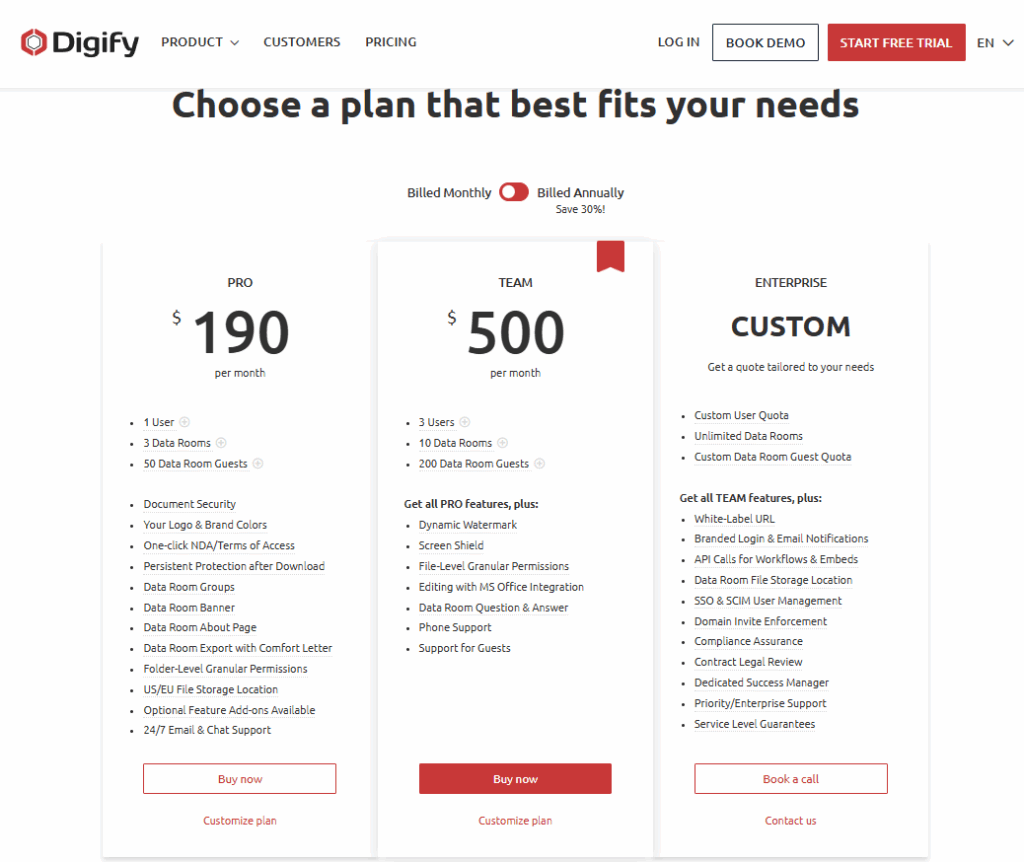
Digify offers a tiered subscription model with plans that scale based on user count, data room capacity, and advanced features. Digify also provides a 30% discount for annual billing.
Digify pricing plans
Digify pricing plans and features
Plan
Price
Key features
Pro
$190/month
🔹 1 user/50 guests 🔹 3 data rooms 🔹 100 GB encrypted storage 🔹 One-click NDA/Terms of Access 🔹 Persistent Protection After Download (PPAD) 🔹 Folder-level permissions 🔹 24/7 email & chat support
Team
$500/month
🔹 3 users/200 guests 🔹 10 data rooms 🔹 500 GB encrypted storage 🔹 Includes all Pro features 🔹 Screen shield & dynamic watermark 🔹 File-level permissions 🔹 Q&A module 🔹 Phone support
Enterprise
Custom
🔹 Custom user and quest quota 🔹 Unlimited data rooms 🔹 Custom storage quota 🔹 Includes all Team features 🔹 White-label URL & branding 🔹 API & SSO integration 🔹 Compliance assurance 🔹 Dedicated success manager
DocSend pricing
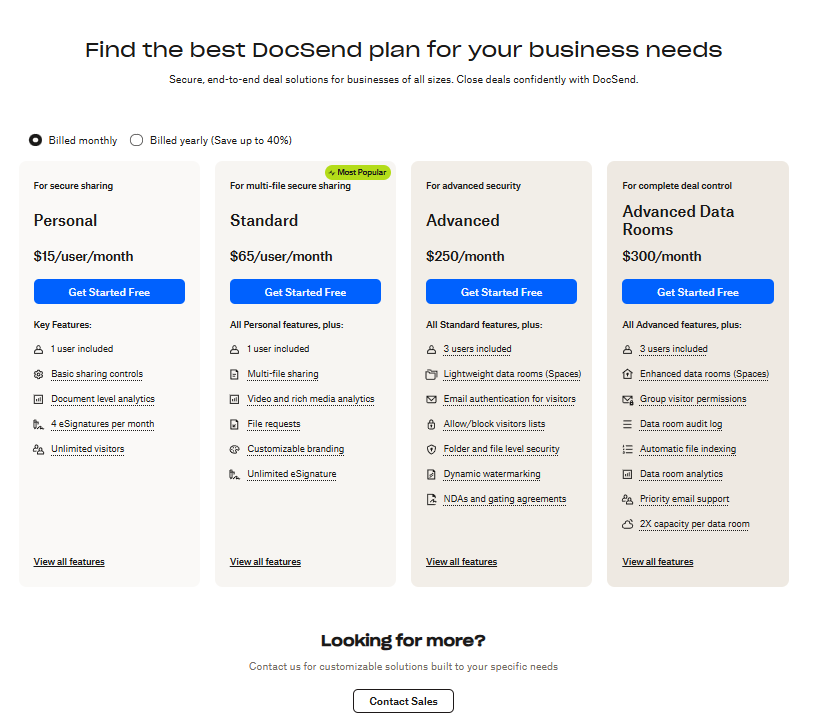
DocSend follows a user-based subscription model with tiered plans that scale by feature depth, ranging from basic file sharing to data room capabilities. DocSend offers an annual billing discount of up to 40%.
🔹 1 user 🔹 50 GB/user 🔹 200 assets/data room 🔹 Unlimited data rooms 🔹 Unlimited eSignatures 🔹 All personal features 🔹 Multi-file sharing 🔹 Video & media analytics 🔹 File requests 🔹 Custom branding
Advanced
$250/month
🔹 3 users 🔹 50 GB/user 🔹 2,000 assets/data room 🔹 Unlimited data rooms 🔹 All Standard features 🔹 Lightweight data rooms 🔹 Folder-level security 🔹 Dynamic watermarking 🔹 NDAs & Terms of Access
Advanced Data Rooms
$300/month
🔹 3 users 🔹 50 GB/user 🔹 4,000 assets/data room 🔹 Unlimited data rooms 🔹 All Advanced features 🔹 Enhanced data rooms (Spaces) 🔹 Data room audit log 🔹 Group visitor permissions 🔹 Auto file indexing 🔹 Priority email support
How do their pricing plans compare?
DocSend is more affordable for basic sharing needs, while Digify justifies its higher cost, especially under enterprise plans, with full VDR functionality.
Docsend vs Digify: A summary of pros and cons
Digify and DocSend offer robust solutions for secure document sharing, but they cater to different workflows. The table below highlights the key strengths and limitations of each platform to help you make an informed decision.
✔️ Broader file type support ✔️ Audit log ✔️ Custom subdomain and URL ✔️ Cheaper entry plans
Cons
❌ Fewer file formats supported ❌ No audit log ❌ Fewer branding options ❌ No in-document feedback
❌ Lacks protection after download ❌ Basic access control ❌ No screenshot or copy restriction ❌ Time-restricted customer support
📌 Verdict: If you need a formal, compliance-ready data room, choose Digify. If your focus is external sharing, engagement tracking, branded presentation, and pitch deck sharing tools, DocSend is the stronger fit.
Alternatives & competitors
Here are three trusted VDR providers to consider when your workflow requires features or capabilities that go beyond what Digify or DocSend offer.
Ideals VDR
Ideals is a widely used enterprise-grade virtual data room solution trusted by investment banks, law firms, and global corporations. It may be a better fit for organizations that require enhanced security and compliance in M&A, especially cross-border deals. Here’s where Ideals have an advantage over Digify and DocSend:
✔️ 8 levels of folder/file granular access permissions
✔️ Role-based Q&A workflows with automation and multi-threaded discussions
✔️ DRM with Excel formulas on/off
✔️ Built-in document redaction with auto-detection and bulk-redact features
✔️ Granular audit trails with custom and scheduled reports
✔️ SOC 1/2/3, ISO 27001, GDPR, HIPAA, PCI DSS
✔️ Document translation and AI-aided document search
Datasite
Datasite is a legacy enterprise VDR and due diligence software provider used primarily in large-scale M&A, restructuring, and capital market transactions. It may be more suitable than Digify or DocSend for global teams managing hundreds of participants and sensitive financial data. Here is where Datasite excels compared to Digify and DocSend:
✔️ Built-in sell-side due diligence trackers, with priorities, ownership, and comments
✔️ SOC 2 Type II; ISO 27001, 27017, 27018, 27701, 42001
✔️ Strategic consulting support
✔️ Built-in market intelligence tools
✔️ Buy-side risk assessment tools
💡 Additional reading:Datasite vs Donneley DFIN — take a closer look at these competing enterprise VDRs.
Ansarada
Ansarada is an AI-powered virtual data room built to support complex transactions and infrastructure procurement processes with advanced automation. It may be a better fit than Digify or DocSend when deal teams require machine-assisted document management for high-volume transactions.
Here is how Ansarada is better than Digify and DocSend in that context:
✔️ AI-powered automatic document sorting and categorization
✔️ AI-powered bidder engagement analytics trained on more than 37,000 deals
✔️ Built-in deal workflows, including due diligence checklists, NDA trackers, and tasks
✔️ Procurement workflows, including submissions
Key takeaways
Digify or DocSend? The choice depends on your workflow. Digify delivers full VDR functionality and extensive security features for compliance-intensive transactions.
Dropbox DocSend, by contrast, suits teams focused on outreach, offering branded delivery, analytics, and lightweight access control. Each excels within its intended context — structured deals vs. external communications.
FAQ
What is the main difference between Digify and DocSend?
Digify is a full-featured virtual data room built for handling sensitive documents and secure, structured deal management, while DocSend is optimized for branded document sharing and external stakeholder engagement.
Which VDR is more secure?
Both platforms offer strong encryption and access controls, but Digify includes stricter protections like screenshot blocking, persistent file restrictions, and deeper permission granularity.
Which is more cost-effective for small M&A deals?
Digify offers better value for small M&A deals by bundling data room-specific features into its
Author
Editorial Team of dataroom-providers.org
Data room selection & optimization expert with 10+ years of helping companies collaborate more securely on sensitive documents.
We use cookies on our website to ensure the best user experience. By clicking "Agree" you are letting us use cookies according to our cookie policy. Learn more